Logo in CSS
This article was published before 2022, therefore before the rise of generative AI. Some information may now be outdated. The period drawings and visuals shown here were created without the assistance of artificial intelligence.
I am currently working for Twenga, a price comparison site.
Like most companies, it has a strong visual identity, marked by a logo identifiable by a target, marked with an arrow.
For fun and because it was trendy, I got drawn into recreating the logo in pure CSS, with no image or JavaScript!
An exercise as tedious as it is fun and pointless, I tackled it, curious to see whether I would run into any unexpected difficulty or discovery!
The HTML structure
<div id="logo">

	<span class="circle1">The main blue outer circle.</span>
	<span class="circle2">On top of the blue circle, the first inner circle, white.</span>
	<span class="circle3">The small blue circle at the center of the target.</span>
	<span class="circle4">The nearly transparent white circle that creates the reflective effect for the whole target.</span>
	<span class="arrow1">The tip of the white arrow that stands out.</span>
	<span class="arrow2">White mask.</span>
	<span class="arrow3">The tip of the brown arrow.</span>
	<span class="arrow4">Left white part of the arrow, which goes over the outer circle.</span>
	<span class="arrow5">Left brown part of the arrow, which goes over the circle.</span>
	<span class="arrow6">Brown right / upper part of the arrow.</span>
	<span class="arrow7">Mask for the bottom of the previous part, with the same background as the blue circle.</span>
	<span class="arrow8">Mask of the mask (!) which makes it possible to soften the blue of the mask below in the same way as span.circle4 does.</span>

</div>
Nothing too difficult then, as you can see!
The CSS
#logo{position:relative;margin:74px 0 0 80px;text-indent:-9999px;}
#logo span{position:absolute;display:block;}

.circle1{
	clip:rect(-2px,257px,276px,-6px);
	top:77px;left:21px;
	width:241px;height:267px;
	border:1px solid transparent;
	border-top-left-radius:145px 160px;
	border-top-right-radius:110px 123px;
	border-bottom-left-radius:110px 120px;
	border-bottom-right-radius:144px 157px;
	-webkit-box-shadow:0 0 0 100px #fff;
	background:#01b0e7;
	background:-moz-radial-gradient(center, ellipse cover,  #0072a1 1%, #01b0e7 60%) 51px 26px;
	background:-webkit-gradient(radial, 51px 26px, 0px, 51px 26px, 100%, color-stop(1%,#0072a1), color-stop(60%,#01b0e7));
	background:-webkit-radial-gradient(center, ellipse cover,  #0072a1 1%,#01b0e7 60%) 51px 26px;
	background:-o-radial-gradient(center, ellipse cover, #0072a1 1%, #01b0e7 60%) 51px 26px;
	background:-ms-radial-gradient(center, ellipse cover,  #0072a1 1%, #01b0e7 60%) 51px 26px;
	background:radial-gradient(center, ellipse cover,  #0072a1 1%, #01b0e7 60%) 51px 26px;
}

.circle2{left:54px;top:131px;width:145px;height:145px;background:#fff;border-radius:73px;
	-moz-transform:rotate(64deg) skew(-4deg, 15deg);
	-webkit-transform:rotate(64deg) skew(-4deg, 15px);
	-o-transform:rotate(64deg) skew(-4deg, 15px);
	-ms-transform: rotate(64deg) skew(-4deg, 15px);
}

/* Central element */
.circle3{
	top:163px;left:84px;
	width:80px;height:75px;
	border-radius:50px;
	background:#009dd2;
	background:-moz-linear-gradient(-45deg, #00a0d7 0%, #19b3e6 100%);
	background:-webkit-gradient(linear, left top, right bottom, color-stop(0%,#00a0d7), color-stop(100%,#19b3e6));
	background:-webkit-linear-gradient(-45deg, #00a0d7 0%,#19b3e6 100%);
	background:-o-linear-gradient(-45deg, #00a0d7 0%,#19b3e6 100%);
	background:-ms-linear-gradient(-45deg, #00a0d7 0%,#19b3e6 100%);
	background:linear-gradient(-45deg, #00a0d7 0%,#19b3e6 100%);
	-moz-transform:rotate(72deg) skew(-4deg, 15deg);
	-webkit-transform:rotate(72deg) skew(-4deg, 15px);
	-o-transform:rotate(72deg) skew(-4deg, 15px);
	-ms-transform:rotate(72deg) skew(-4deg, 15px);
}

.circle4{
	top:-59px;left:6px;
	width:260px;height:260px;
	border-radius:130px;
	background:#fff;
	opacity:0.2;
	clip:rect(133px,247px,272px,30px);
}

.arrow1{
	border-top:50px solid transparent;
	border-right:42px solid transparent;
	border-bottom:41px solid transparent;
	border-left:47px solid #fff;
	height:1px;width:1px;top:159px;left:94px;
	-moz-transform:rotate(21deg);
	-webkit-transform:rotate(21deg);
	-o-transform:rotate(21deg);
	-ms-transform:rotate(21deg);
}

.arrow2{width:30px;height:60px;background:#fff;top:162px;left:77px;}

.arrow3{
	border-left:34px solid #894436;
	border-right:34px solid transparent;
	border-top:30px solid transparent;
	border-bottom:30px solid transparent;
	height:1px;width:1px;top:175px;left:93px;
	-moz-transform:rotate(21deg);
	-webkit-transform:rotate(21deg);
	-o-transform:rotate(21deg);
	-ms-transform:rotate(21deg);
}

.arrow4{
	width:168px;height:121px;
	top:10px;left:20px;
	background:transparent;
	border:38px solid #fff;
	border-top-left-radius:45px 158px;
	border-bottom-left-radius:125px 121px;
	border-right:none;
	border-left-width:46px;
	border-top-width:none;
	border-bottom-width:none;
	clip:rect(0px,65px,272px,0);
}

.arrow5{
	width:168px;height:146px;
	top:0;left:28px;
	background:transparent;
	border:20px solid #8b4438;
	border-top-left-radius:141px 158px;
	border-top-right-radius:103px 137px;
	border-bottom-right-radius:102px 60px;
	border-bottom-left-radius:125px 121px;
	border-right:none;
	border-left-width:28px;
	border-top-width:46px;
	border-bottom-width:10px;
	clip:rect(0px,90px,272px,0);
}
.arrow6{
	width:118px;height:146px;
	top:0;left:28px;
	background:transparent;
	border:20px solid #8B4438;
	border-top-left-radius:141px 158px;
	border-top-right-radius:134px 137px;
	border-bottom-right-radius:102px 60px;
	border-bottom-left-radius:125px 121px;
	border-right-width:50px;
	border-left-width:28px;
	border-top-width:46px;
	border-bottom-width:10px;
	clip:rect(0px,200px,90px,64px);
}

.arrow7{
	background:#01b0e7;
	top:77px;left:21px;
	width:241px;height:267px;
	border:1px solid transparent;
	border-top-left-radius:145px 160px;
	border-top-right-radius:110px 123px;
	border-bottom-left-radius:110px 120px;
	border-bottom-right-radius:144px 157px;
	box-shadow:0 0 0 10px #fff;
	-webkit-box-shadow:0 0 0 10px #fff;
	-ms-box-shadow:0 0 0 10px #fff;
	clip:rect(-15px,208px,32px,143px);
}

.arrow8{
	background:#fff;
	top:77px;left:21px;
	width:241px;height:267px;
	border:1px solid transparent;
	border-top-left-radius:145px 160px;
	border-top-right-radius:110px 123px;
	border-bottom-left-radius:110px 120px;
	border-bottom-right-radius:144px 157px;
	box-shadow:0 0 0 10px #fff;
	-webkit-box-shadow:0 0 0 10px #fff;
	opacity:0.2;
	clip:rect(-15px,208px,32px,143px);
}
The first results are encouraging:
- First encouraging observation: apart from the radial gradient, all the latest browsers fully and consistently support the properties needed to get the job done.
- But with one caveat: many properties are still prefixed by their browser vendors (-o, -webkit, etc.). This multiplies the number of code lines, and therefore the bulk, of course. Fortunately, among them, some have on the contrary abandoned their cumbersome prefixes.
- The rendering is not yet perfect and lines appear here and there, between two borders! The worst student turns out to be… Opera!
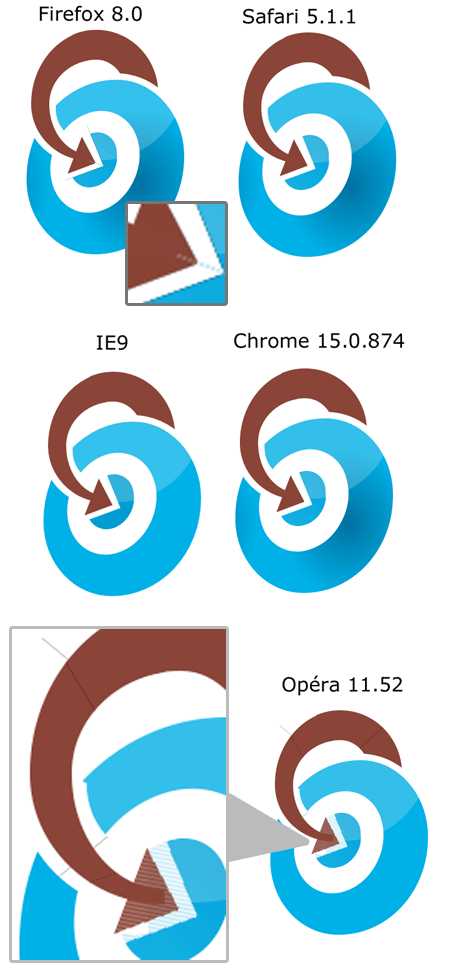
logo Twenga en full CSS
Some observations for setting up this kind of exercise:
- As in painting, it is better to start with the background elements, and then “build up” toward the details as you go.
- Do not hesitate to split elements that seem to form a single block in order to achieve your goal! We are bending CSS away from its original uses, so it is normal to hack it together!
- Do not hesitate to use the background as an element that overlaps the others to draw a counter-shape. Of course, the logo then becomes dependent on the background, but it is a hack 🙂
- Although it is more than likely that the techniques will vary a lot from one logo to another, techniques I have never had the chance to use turn out to be particularly useful here.
- For example, the crop property, generally underused, proves particularly useful. One even wonders why its parameters are so limited in the end (there is rect(), but not circle()?).
As for a practical application, it would not occur to anyone; given the number of unnecessary and semantically empty DOM elements, CSS properties diverted from their original functions such as borders, it is immediately obvious that a logo as an image, or even in SVG, would seem much more appropriate.